


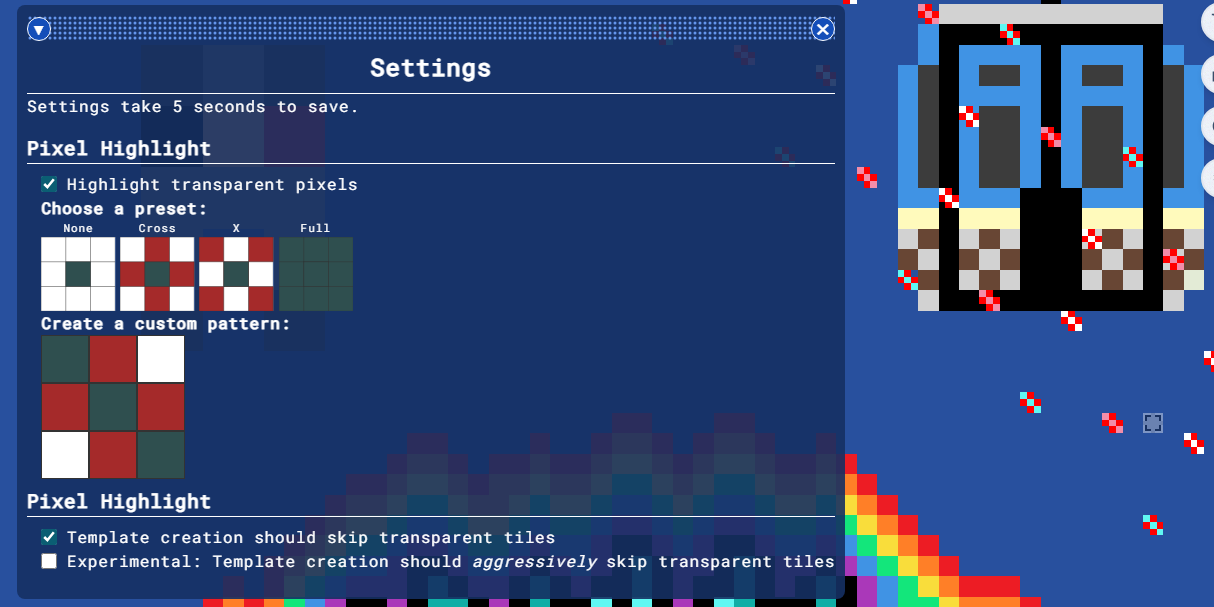
In this version, you can now highlight incorrectly placed pixels. You can also display full-sized template pixels. In addition, Blue Marble will now attempt to skip large transparent areas of your template, during template creation. This should make Blue Marble faster for certain templates.
Check it out! https://github.com/SwingTheVine/Wplace-BlueMarble/releases/tag/pre
Change Log
User-Specific
YOU CAN NOW HIGHLIGHT INCORRECT PIXELS using the "Settings Window."
Also, you can additionally highlight pixels that are incorrectly transparent on the canvas (or highlight only placed pixels that are also incorrect pixels).
Fixed a bug where coordinate information was displayed in the wrong area of the pixel information menu.
You can now display the end result of the template ("full-sized template pixels") by using a certain highlight pattern.
Added a Settings Window that contains user-settings. This will persist between sessions.
Windows in Windowed Mode will now properly render vertically aligned content. E.g. The title "Color Filter" in the small color filter window will now be vertically centered.
Fixed English grammar issue where the color filter window displayed "1 incorrect pixels."
Added "correct pixels" and "total pixels" display to the color filter in windowed mode.
By default, on template creation, tiles that the template appears on, in which the template is 100% transparent in that tile, will not be saved. This will increase (up to 10000% in some cases) template loading times. This can be disabled in the settings window.
Users can now tell Blue Marble to, upon template creation, aggressively discard tiles that the template appears to be 100% transparent. The difference between this and the default option is that you are more likely to lose small portions of your template if a specific tile only has a few template pixels on it. As a trade-off, enabling this makes the default option run 50 to 100 times faster. Users can enable this in the settings window. The default option must be enabled for this experimental option to work.
Using one or both of the template creation options listed above, users can now feasibly have a single template for two pieces of artwork, which are millions of pixels away from each other. Blue Marble will ignore the empty tiles in-between the two pieces of art.
Added more supporters to the credits.
Developer-Specific
CSS declarations will no longer fight over who gets to determine how Windowed Mode looks.
CSS declarations, which determine how Windowed Mode looks, will no longer greedily apply to Full-screen Mode.
Fixed JSDoc issue that brought the [code wikipedia](https://swingthevine.github.io/Wplace-BlueMarble/) offline from the release of 0.91.0 to the release of 0.92.0.
TemplateManagerno longer passes inWindowMain. Now,TemplateManagerreceives the currentWindowMaininstance usingTemplateManager.setWindowMain().Fixed miscellaneous issues with invalid JSDoc syntax that was failing safely.
The logic for
.addCheckbox()has changed to allowinnerHTMLto be passed into the<label>element instead of defaulting to the<input>element. If you pass in both at once, the former will go to the<label>, and the latter will go to the<input>.You can now retrieve/modify user settings from any place that the
SettingsManagerclass instance is accessible. However, it will always take up to 5 seconds for changes to save to user storage (changes go into effect instantly, then they are stored later).The coordinates that Blue Marble injects into the pixel information menu is now a flexbox. Each coordinate is a child.